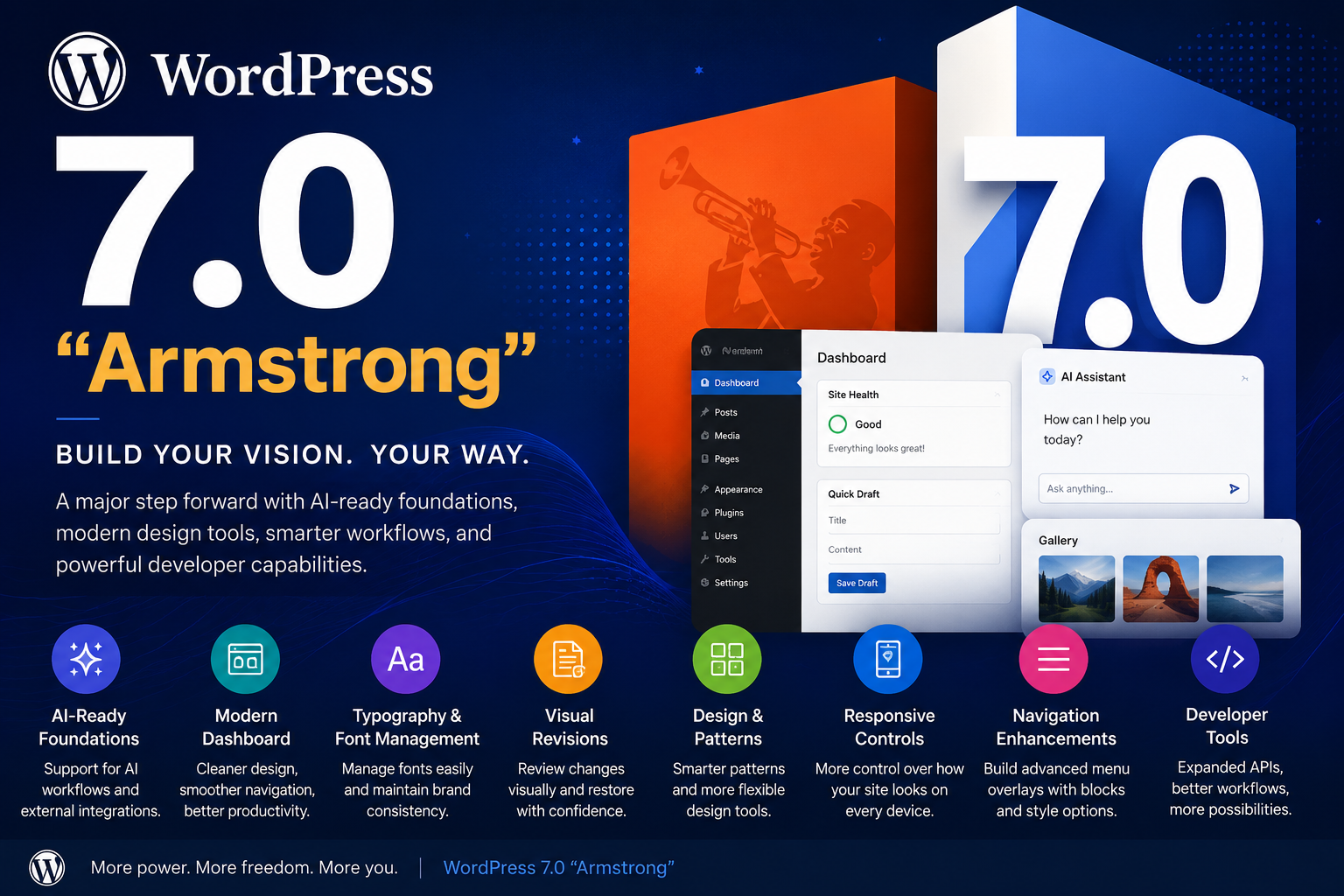
WordPress continues to evolve, and WordPress 7.0 “Armstrong” introduces several improvements aimed at making website creation more flexible, efficient, and future-ready.
Named after legendary jazz musician Louis Armstrong, this release focuses on enhancing the website-building experience through modern design tools, workflow improvements, customization features, and expanded developer capabilities.
Whether you’re a developer, business owner, blogger, or content creator, WordPress 7.0 introduces updates designed to improve productivity and simplify website management.
Let’s take a closer look at the major highlights of WordPress 7.0.
1. AI-Ready Foundations in WordPress 🤖
WordPress 7.0 introduces infrastructure that supports broader AI integrations and workflow enhancements across the WordPress ecosystem.
According to the release highlights, the platform includes tools that can support:
- Improved workflow automation
- AI-assisted content experiences
- Better connection management for external services
- Expanded possibilities for content-related tasks
These updates represent an important step toward making WordPress more adaptable to evolving content creation technologies.
2. A Refreshed Dashboard Experience ✨
WordPress 7.0 introduces a more modern admin experience designed to improve usability and navigation.
Some notable improvements include:
✅ Cleaner interface design
✅ Smoother navigation between sections
✅ Faster access to commonly used tools
✅ Improved workflow efficiency
These refinements aim to make day-to-day website management more intuitive.
3. Better Typography & Font Management 🔤
Managing typography becomes more streamlined in WordPress 7.0.
The update introduces improvements that make it easier to:
- Manage fonts from a central location
- Maintain design consistency
- Support multiple theme experiences
- Improve website branding flexibility
This provides more control for designers and website owners.
4. Improved Visual Revisions 📝
Content editing receives usability improvements through enhanced revision handling.
Users can now more easily:
- Review content changes
- Compare revisions visually
- Restore previous versions when necessary
This can be especially helpful for bloggers, editors, agencies, and teams managing content updates.
5. Enhanced Design & Customization Tools 🎨
WordPress 7.0 introduces updates that simplify website customization.
New Design Enhancements
The release includes improvements to:
- Gallery experiences
- Heading customization
- Navigation structures
- Layout flexibility
Smarter Pattern Management
Patterns now offer greater flexibility by allowing users to:
- Reuse layouts more efficiently
- Customize sections independently
- Adjust content structures more easily
These improvements help speed up website building and editing.
6. Better Responsive Design Controls 📱
Mobile responsiveness continues to improve in WordPress 7.0.
Users can now gain more control over:
- Device-specific visibility settings
- Layout responsiveness
- Breakpoint customization
This makes it easier to create experiences optimized for multiple screen sizes.
7. Improved Navigation Customization 🧭
Navigation menus receive greater flexibility through enhanced customization options.
Users can create menu overlays with improved control over:
- Layout structure
- Typography styling
- Navigation appearance
- Menu customization
This is particularly useful for modern websites with advanced menu systems.
8. Block-Level Custom CSS Support 🎯
WordPress 7.0 improves customization by supporting more detailed styling adjustments at the block level.
This gives developers and advanced users greater flexibility when:
- Fine-tuning layouts
- Applying custom styles
- Improving design consistency
9. Expanded Developer Experience ⚙️
Developers also benefit from improvements focused on flexibility and workflow efficiency.
The release highlights include:
- Expanded APIs
- Better support for custom development
- Site Editor enhancements
- Improved development workflows
These improvements aim to support more scalable and maintainable WordPress development.
Why WordPress 7.0 Matters
WordPress 7.0 represents another step forward in improving how websites are built and managed.
By focusing on:
✔ Better customization
✔ Workflow improvements
✔ Responsive design controls
✔ Developer flexibility
✔ Future-ready integrations
WordPress continues evolving to meet the needs of creators, developers, and businesses.
Final Thoughts
WordPress 7.0 “Armstrong” introduces meaningful updates that improve flexibility, usability, and development workflows.
While some features focus on design and customization, others lay the groundwork for future innovations that may shape how users build and manage websites.
Whether you’re creating a blog, business website, portfolio, or custom platform, WordPress 7.0 provides improvements worth exploring.
Disclaimer: This article is an independent overview of WordPress 7.0 features based on publicly available release highlights and documentation. Features may evolve over time.